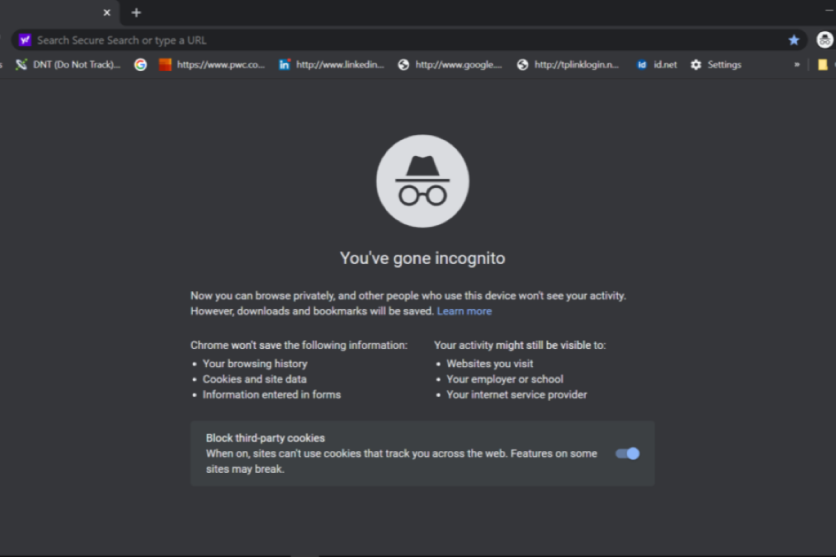
For years, millions of people have opened an Incognito or private browsing window believing it makes them invisible online. Whether it is shopping for a surprise gift, researching a medical condition or simply avoiding targeted adverts, many assume the feature prevents websites, internet providers and even Google from seeing what they do.
The reality is far less dramatic. Private browsing is designed to protect your activity from other people who use the same device, not from the internet itself.
While it does stop your browser from saving your history, cookies and certain temporary data after your session ends, it does not hide your identity from websites, employers, schools or your internet service provider.
Every major browser offers a version of private browsing, but they all work in much the same way. Understanding what these tools actually do can help users make better decisions about their online privacy and avoid a false sense of security.
What Incognito Mode Actually Does
Google Chrome popularised the term 'Incognito mode', but the feature is now available in nearly every major browser. Apple's Safari calls it Private Browsing, Mozilla Firefox uses Private Browsing Mode, while Microsoft Edge refers to it as InPrivate. Although the names differ, their main purpose is largely the same.
When you open an Incognito window in Chrome, the browser starts a separate browsing session. Once every Incognito window is closed, Chrome deletes the browsing history from that session, removes cookies and site data created during it, and clears information entered into forms. This means someone using the same computer later will not be able to open Chrome's history and see which websites were visited during that session.
This makes Incognito particularly useful on shared devices. If you are borrowing a friend's laptop, using a family computer or accessing the internet in a hotel business centre, your browsing activity will not be stored in the browser after you finish.
Private browsing is also useful for testing websites. Developers often use it because it opens websites without existing cookies or cached data, allowing them to see how a page behaves for a first-time visitor.
Another practical use is signing into multiple accounts at once. Because Incognito starts with a fresh session, you can log into a second email or social media account without signing out of your primary one.
Safari's Private Browsing works in a similar way. It prevents browsing history from being saved, isolates tabs from standard browsing sessions and removes website data when the private session ends.
Apple also combines Private Browsing with privacy features such as Intelligent Tracking Prevention, which aims to reduce cross-site tracking by limiting how advertisers use cookies across websites.
Firefox goes a step further by automatically blocking many known tracking cookies during Private Browsing sessions. Microsoft Edge's InPrivate mode similarly deletes browsing history, cookies, cached files and form data once every InPrivate window has been closed.
Despite these differences, none of these browsers promises complete anonymity. Their private modes are designed mainly to limit what is stored on your own device rather than conceal your activity across the internet.
What Incognito Mode Doesn't Hide
This is where many misconceptions begin. Opening an Incognito window does not hide your IP address. Every website you visit can still see the internet connection you are using unless you are also using another privacy tool, such as a trusted virtual private network.
If you sign into your Google account, Facebook, Amazon or any other online service while browsing privately, those companies can still associate your activity with your account. Incognito does not stop websites from recognising you once you identify yourself by logging in.
Your internet service provider can also continue to see which websites you visit because your internet traffic still passes through its network. Likewise, if you are connected through your workplace, university or school network, administrators may still be able to monitor your browsing activity.
Chrome's own documentation makes this clear, noting that schools, employers and internet service providers may still see your activity.
Private browsing also does not protect against malware, phishing attacks or malicious websites. If you download an infected file while using Incognito, it remains on your computer after the session ends. Any bookmarks you save are also retained unless you delete them yourself.
Advertising companies have also become far more sophisticated than simply relying on cookies. While private browsing clears cookies after the session ends, websites can still collect information such as your IP address, browser configuration, screen size, operating system and other technical details.
Combined, these details can contribute to browser fingerprinting, a technique that helps identify returning users even when cookies are limited.
Another common misunderstanding is that Incognito somehow prevents Google from collecting data. In reality, Google states that browsing in Incognito does not change how websites or Google services collect information while you are using them.
If you interact with Google's services or remain signed into an account, those services may still collect data according to their privacy policies.
Research has shown that many users misunderstand these limitations. A University of Chicago study found widespread confusion about what private browsing actually protects, with many participants believing it concealed their activity from websites or internet providers when it does not.
For anyone seeking stronger online privacy, experts generally recommend combining several tools rather than relying solely on private browsing. Privacy-focused browsers, tracker blocking, encrypted connections and reputable VPN services each address different parts of online privacy, although none can guarantee complete anonymity.
Ultimately, Incognito mode is neither a gimmick nor a magic invisibility cloak. It performs exactly the task it was designed for: keeping your browsing session off your own device once you close the window.
It is excellent for maintaining privacy from other people using the same computer, but it does not hide your online activity from websites, internet providers or organisations managing the network you are using.
Understanding that distinction is the key to using private browsing for what it was intended to do, rather than expecting protections it was never designed to provide.
Frequently Asked Questions
- What does Incognito Mode do?Incognito Mode prevents your browsing history, cookies, and site data from being saved on your device after the session ends.
- Does Incognito Mode hide my IP address?No, Incognito Mode does not hide your IP address from websites or your internet service provider.
- Can websites still track me in Incognito Mode?Yes, websites can still track you using methods like browser fingerprinting, even in Incognito Mode.
- Is Incognito Mode the same across all browsers?While the basic functionality is similar, different browsers may have additional privacy features.
- Does Incognito Mode protect against malware?No, Incognito Mode does not protect against malware or phishing attacks.


